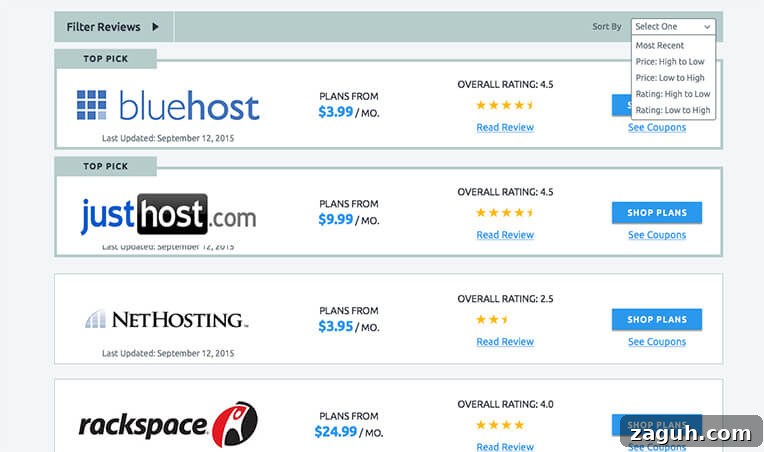
I’m building a website that publishes reviews of hosting companies. For each review I store Price, Rating, and a “Top Pick” flag as post meta. Visitors can sort the review listings by Price, Rating, or Post Date.
The client wants “Top Picks” to always appear first. That means when a user sorts by Price (Low to High), the results should show all Top Picks sorted by price low-to-high first, followed by the remaining reviews sorted by price low-to-high.
In WordPress 4.0, you could pass multiple orderby parameters and specify the order for each, but you were limited to a single meta-based orderby because of the need for a top-level meta_key parameter. For example:
 'be_rating',
	'orderby'  => array(
		'meta_value_num' => 'DESC',
		'post_date'      => 'ASC',
	),
) );
With WordPress 4.2 the query system was improved to allow ordering by multiple meta keys, which makes implementing the “Top Picks first” behavior straightforward. Below is the code I use to build the sort options shown in the screenshot.
 'review',
	'posts_per_page'  => 10,
	'paged'           => get_query_var( 'paged', false ),
	'meta_query'      => array(
		'relation'    => 'AND',
		'be_top_pick' => array(
			'key'     => 'be_top_pick',
			'compare' => 'EXISTS',
		),
		'be_price'    => array(
			'key'     => 'be_price',
			'type'    => 'NUMERIC',
			'compare' => 'EXISTS',
		),
		'be_rating'   => array(
			'key'     => 'be_rating',
			'type'    => 'NUMERIC',
			'compare' => 'EXISTS',
		),
	)
);

// Sort Results
$current_sort = isset( $_GET['hosting-sort'] ) ? esc_attr( $_GET['hosting-sort'] ) : 'most-recent';

switch( $current_sort ) {

	case 'most-recent':
		$args['orderby']  = array(
			'be_top_pick' => 'DESC',
			'post_date'   => 'DESC',
		);
		break;

	case 'price-high':
		$args['orderby'] = array(
			'be_top_pick' => 'DESC',
			'be_price'    => 'DESC',
		);
		break;

	case 'price-low':
		$args['orderby'] = array(
			'be_top_pick' => 'DESC',
			'be_price'    => 'ASC',
		);
		break;

	case 'rating-high':
		$args['orderby'] = array(
			'be_top_pick' => 'DESC',
			'be_rating'   => 'DESC',
		);
		break;

	case 'rating-low':
		$args['orderby'] = array(
			'be_top_pick' => 'DESC',
			'be_rating'   => 'ASC',
		);
		break;
}

$loop = new WP_Query( $args );
How it works
- I start by constructing the base query arguments: post type, posts per page, and pagination.
- I include a meta_query entry for every meta key used for sorting. Each entry has
'compare' => 'EXISTS'because I want posts that include those meta keys without restricting the query to specific values. - For numeric metadata (Price and Rating) I specify
'type' => 'NUMERIC'so WordPress uses numeric comparison and sorts usingmeta_value_numinstead ofmeta_value. That prevents lexical ordering when sorting numbers. - In the theme template, a dropdown adds a GET parameter (
hosting-sort) to indicate the user’s chosen sort. I read that GET variable and fall back to a default sort of “most recent” if it’s not present. - Depending on the selected sort, I set the
orderbyargument to an ordered array wherebe_top_pickis always listed first with a descending order so Top Picks appear first. The second orderby key handles the requested secondary sort (price, rating, or post date).
Notes and best practices
- Use the same key names in your
meta_queryentries as you reference in theorderbyarray. - Specify numeric types for numerical meta to avoid incorrect ordering of values like “10” vs “2”.
- Because WordPress 4.2 allows multiple meta-based orderby clauses, this pattern keeps Top Picks at the top while still honoring the user’s chosen sorting preference for the rest of the results.